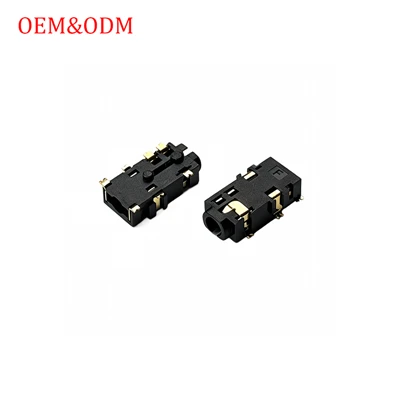
Hey there! If you're in the audio game, dealing with SMT (Surface Mount Technology) headphone jacks, you know how crucial sensitivity can be. I'm part of an SMT headphone jacks supplier team, and we've been through all the ins and outs of these little yet vital components. In this blog, I'm gonna share some tips on how to adjust the sensitivity of SMT headphone jacks.
First things first, let's understand what sensitivity means in the context of SMT headphone jacks. Sensitivity here refers to how well the jack can detect the insertion and removal of a headphone plug and also how accurately it can transmit the audio signal. A jack that's too sensitive might give false detections, like thinking a headphone is plugged in when it's not. On the other hand, if it's not sensitive enough, it might not register the plug properly, leading to poor audio quality or even no sound at all.
Understanding the Components
Before we dig into the adjustment process, it's important to have a basic understanding of the key components of SMT headphone jacks. These jacks typically consist of contacts, switches, and sometimes detection circuits. The contacts are what make the electrical connection with the headphone plug. The switches are used to detect the insertion and removal of the plug, and the detection circuits help in sending signals to the device to indicate the status of the headphone connection.
Step 1: Check the Hardware Installation
One of the most common reasons for incorrect sensitivity is a faulty hardware installation. Make sure that the SMT headphone jack is properly soldered onto the PCB (Printed Circuit Board). Any loose or misaligned solder joints can disrupt the electrical connection and affect the sensitivity. You can use a magnifying glass or a microscope to inspect the solder joints closely. If you find any issues, you can resolder the joints using a soldering iron. Just be careful not to overheat the jack, as this can damage it.
Step 2: Adjust the Mechanical Contacts
The mechanical contacts inside the SMT headphone jack play a crucial role in determining its sensitivity. Over time, these contacts can get worn out or bent, which can lead to a change in sensitivity. You can try gently adjusting the contacts using a small, non - conductive tool like a plastic pick. Be very careful when doing this, as applying too much pressure can break the contacts. Slowly bend the contacts back into their original position to ensure a good and consistent connection with the headphone plug.
Step 3: Tweak the Detection Circuit
Many SMT headphone jacks come with a detection circuit that helps in detecting the presence of a headphone plug. You can adjust the sensitivity of this circuit by modifying some of its components. For example, if you're using a resistor in the circuit, changing its value can alter the sensitivity. However, this requires a good understanding of electronics and circuit theory. If you're not confident in doing this, it's best to consult an electronics engineer.
Step 4: Software Calibration
In some cases, the sensitivity of SMT headphone jacks can be adjusted through software. If the device that the jack is installed in has a built - in audio driver, you can try calibrating the driver settings. Most modern operating systems have audio control panels where you can adjust various audio parameters, including the sensitivity of the headphone input. You might need to experiment a bit to find the right settings for your specific jack.
Our Product Offerings
As a supplier, we offer a wide range of SMT headphone jacks with different features and sensitivity levels. For example, our SMT Headphone Jack PJ - 218 - 7P is known for its high - quality audio transmission and reliable detection. It has a well - designed contact system that provides consistent sensitivity. Another great option is the SMT Jack With Detection Switch PJ - 325 - 4P. This jack comes with a built - in detection switch that can be easily adjusted to suit your sensitivity needs.
If you're looking for a more compact option, our SMT Headphone Jack PJ - 325 - 3P is a great choice. It offers good sensitivity in a smaller form factor. And for those who need a very precise detection system, the SMT Jack With Detection Switch PJ - 325 - 4P - K has a high - precision detection switch that can be fine - tuned for optimal sensitivity.
Troubleshooting Common Sensitivity Issues
Sometimes, even after trying all the above methods, you might still face sensitivity issues. Here are some common problems and their solutions:


- False detections: If the jack is giving false detections, it could be due to electromagnetic interference (EMI). You can try adding EMI shielding to the jack or the PCB to reduce this interference. Another possibility is that the contacts are dirty. You can clean the contacts using a small amount of isopropyl alcohol and a soft brush.
- No detection: If the jack fails to detect the headphone plug, check for any broken or loose wires in the connection. Also, make sure that the headphone plug is compatible with the jack in terms of size and shape.
Wrapping Up and Looking Ahead
Adjusting the sensitivity of SMT headphone jacks can be a bit of a tricky task, but with the right knowledge and tools, it's definitely doable. Whether you're a DIY enthusiast or a professional audio device manufacturer, understanding how to optimize the sensitivity of these jacks is essential for getting the best audio experience.
As a supplier, we're always here to support you. If you have any questions about our SMT headphone jacks or need help with adjusting the sensitivity, don't hesitate to reach out. We can provide you with technical support and advice to ensure that you're getting the most out of our products. If you're interested in purchasing our SMT headphone jacks, feel free to get in touch with us for more details and let's start a fruitful business relationship.
References
- Electronics for Dummies, by Gordon McComb
- Audio Engineering Handbook, by Glen Ballou